
Connect & Manage
Your Hub is running at a URL — say https://your-hub-name.fly.dev (or http://your-machine-ip:4242 on your network). Here’s how to use and maintain it.
Link a device
Section titled “Link a device”Link each device to your Hub using whichever Treeline it runs — the desktop app or the CLI. Either way, a browser opens where you paste your master token (the value of TL_HUB_TOKEN, or the one printed when you started the Hub) to authorize. Each device then gets its own scoped token with pull and push permissions — nothing privileged is stored on the device.
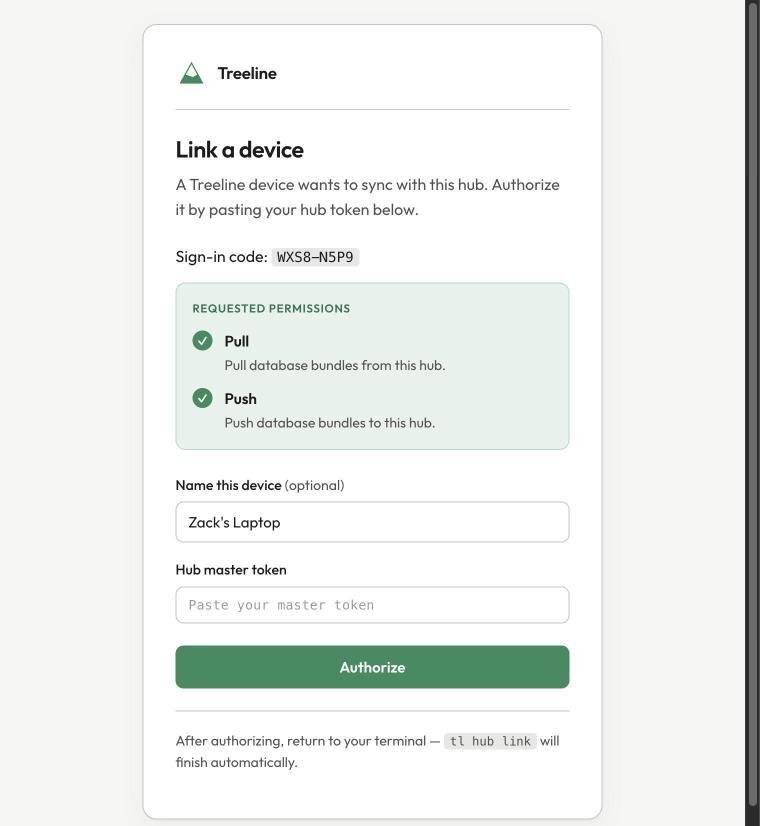
Desktop app
Section titled “Desktop app”Most people will use this. Hub support is currently behind an experimental flag:
- Enable Hub under Settings → Advanced → Experimental features.
- Go to Settings → Hub and click Link a hub.
- Enter your Hub’s URL and authorize in the browser.
That’s it — no commands to run. While the app is open it syncs automatically, pushing your changes and pulling remote ones, and shows sync state in the status bar (including a Review & resolve flow for conflicts).
For a headless box, a server, or a machine where you only use tl:
tl hub link --url https://your-hub-name.fly.devThis prints a verification URL; open it, paste your master token, and it finishes automatically. Unlike the desktop app, the CLI does not sync on its own — you move data with:
tl hub push # send local changes up to the Hubtl hub pull # pull the latest downtl hub status # check the connectiontl hub unlink # disconnect this device (local data is kept)Or run tl hub watch to push and pull automatically as data changes — see Run Watch as a Service to keep it running in the background.
Connect AI agents (remote MCP)
Section titled “Connect AI agents (remote MCP)”Point any network-capable MCP client at your Hub’s /mcp endpoint — your own Hub’s address with /mcp on the end:
https://<your-hub-address>/mcpFor example, a Fly Hub would be https://your-hub-name.fly.dev/mcp — substitute your real address. The Hub runs its own OAuth server, so the client walks you through authorizing on first use: you’ll paste your master token to approve it. This is what lets Claude on your phone, ChatGPT, or any networked MCP agent reach your finances.
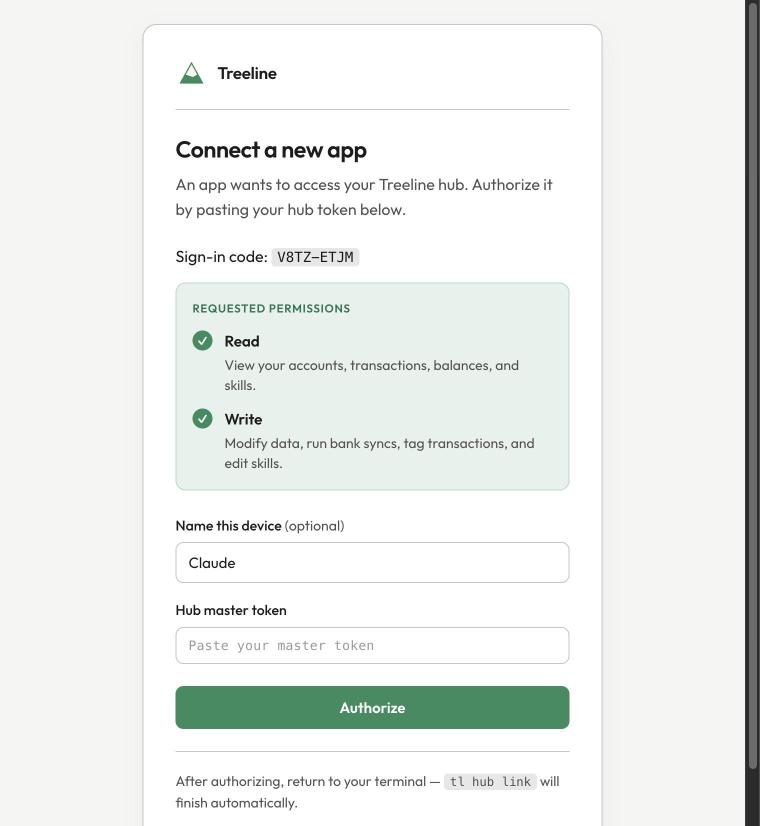
Agents request read, plus write if they’ll tag or edit data — you approve exactly what’s shown before anything connects.
For an agent on the same machine as your data, you don’t need a Hub — use tl mcp directly. See MCP Server.
Conflicts
Section titled “Conflicts”If the same data changes in two places between syncs — say an AI agent tags a transaction through the Hub while this device edits the same one — Treeline detects the conflict instead of overwriting either side. Sync pauses for that device until you resolve it: the desktop app raises a warning with a Review & resolve button, and the CLI reports it on push and watch.
Inspect exactly what differs, then pick which side wins:
tl hub conflicts # row-by-row detail of every conflicting value (--json for scripting)tl hub resolve local # conflicting values take this device's versiontl hub resolve hub # conflicting values take the Hub's versionResolving is a three-way merge, not an overwrite. Only the values that genuinely conflict take the chosen side — non-conflicting changes from both sides are kept, whichever you pick. The Hub also snapshots its database before accepting any push (it keeps the last 20), so a resolution is never unrecoverable.
To discard one side wholesale instead, tl hub push --force (this device wins, including non-conflicting Hub changes) or tl hub pull (the Hub wins likewise).
Manage tokens
Section titled “Manage tokens”Every linked device and connected agent holds its own scoped token. The tokens live on the Hub and never travel with the bundle, so list and revoke them on the Hub itself — the machine running tl serve, or a shell into the container:
tl hub tokens listtl hub tokens revoke <prefix> # the first 8 characters shown by `tokens list`Revoking signs that device or agent out immediately — useful if you lose a device.
Updates
Section titled “Updates”Updating means pulling a newer image tag and redeploying:
- Track latest: deploy
ghcr.io/treeline-money/treeline-hub:latestand redeploy to pick up changes. - Pin a version: deploy a specific tag like
:26.8.1203for a stable, reproducible Hub, and bump it deliberately.
On Fly: fly deploy --image ghcr.io/treeline-money/treeline-hub:<tag> -a your-hub-name. On other platforms, change the tag and redeploy. Your data is on the volume, so it survives the upgrade.
Backups
Section titled “Backups”Your entire financial database is a single DuckDB file in the Hub’s data directory (/root/.treeline in a container, ~/.treeline when serving from your own machine). Back it up like any other file — snapshot the volume, or copy treeline.duckdb out.
Encryption
Section titled “Encryption”Encrypt the database at rest on the Hub by setting one of:
TL_DB_PASSWORD— a passphrase, orTL_DB_KEY— a raw key
Set it the same way you set TL_HUB_TOKEN. The key stays on your Hub and never leaves it — you hold it, and nobody else can read your data.